




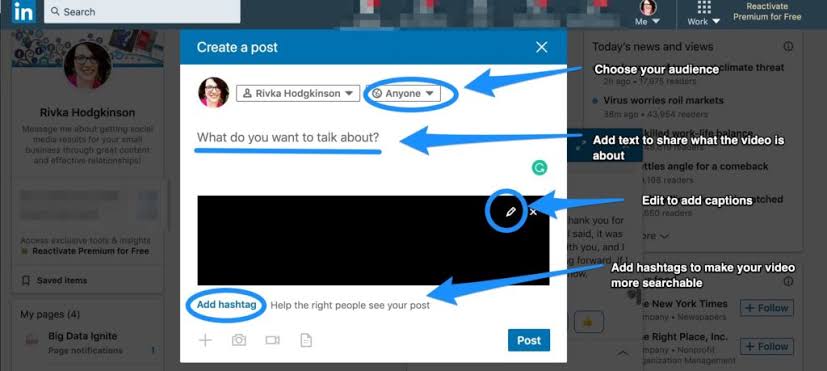
If you are building a personal brand, growing a business, or looking to share professional expertise, you have likely wondered: Can I post a video on LinkedIn? The answer is yes. LinkedIn currently supports uploading various video formats and increasingly prioritizes video content on the feed to boost engagement between users, individuals, and businesses.
Beyond simply uploading videos, LinkedIn also allows you to share company introduction videos, recruitment videos, webinars, tutorial videos, and many other professional content to reach the right professional community. In this article, you will discover how to post a video on LinkedIn, the supported formats, and optimization tips to help your videos display professionally, increase views, and boost engagement in 2026. Join Adsupport as we explore this!
Can I post a video on LinkedIn?
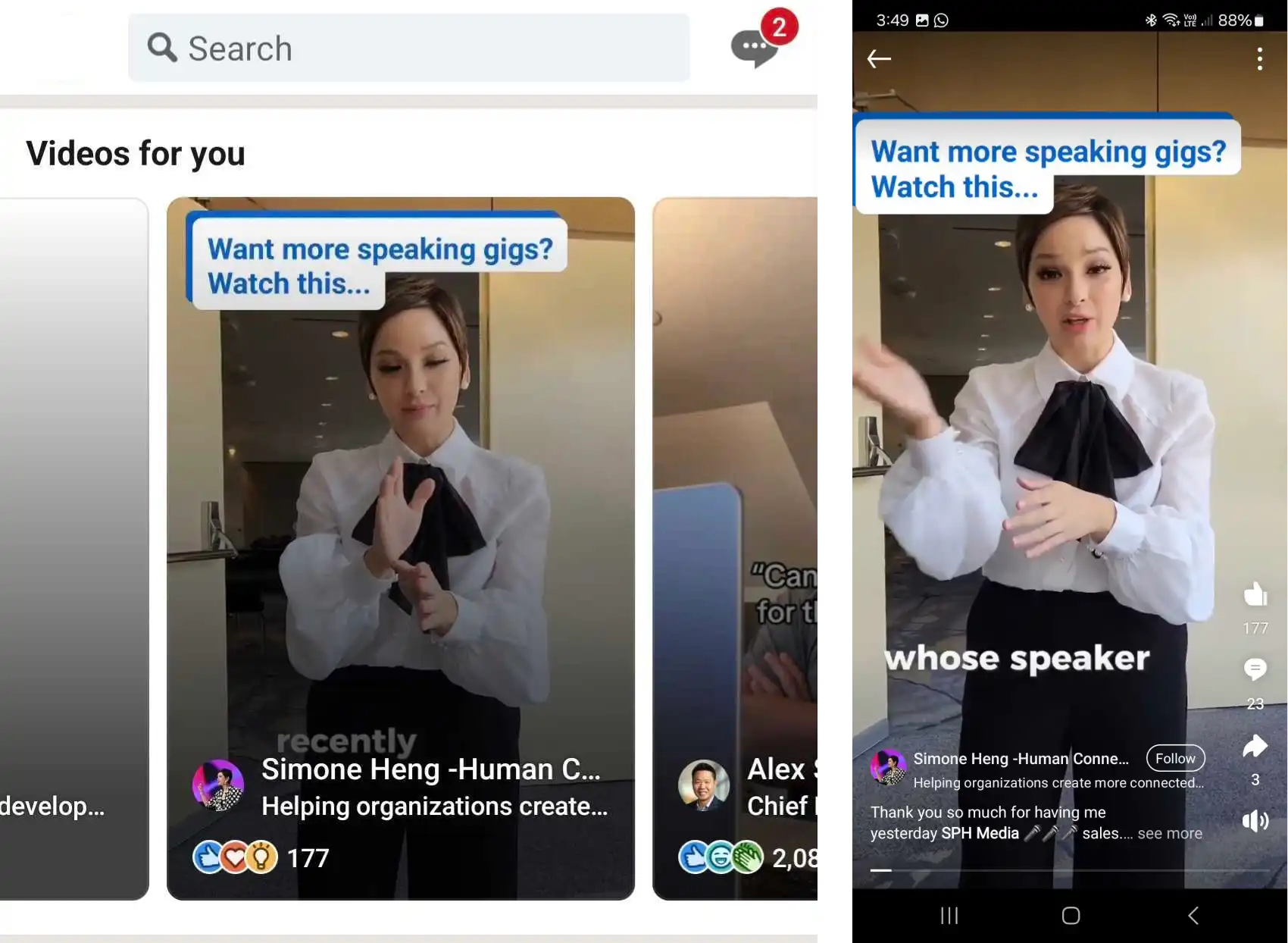
Yes. LinkedIn allows users to post videos directly on both personal profiles and Company Pages (LinkedIn Pages). In recent years, LinkedIn has invested heavily in video content to encourage professional knowledge sharing, personal branding, and stronger connections between businesses and potential clients. By 2026, video has become one of the top-engaging content formats on the platform.
However, posting a video on LinkedIn is not the same as on Facebook, TikTok, or Instagram. LinkedIn prioritizes professional videos that deliver value, share experience, or tell stories about businesses and careers. Understanding proper posting methods and video optimization will help you reach the right audience within a professional social networking environment.
Which account types does LinkedIn support for video posting?
LinkedIn supports video posting across almost all active account types. You can post videos on:
- Personal Profiles: Ideal for personal branding, sharing experience, knowledge, or career journeys.
- Company Pages (LinkedIn Pages): Ideal for showcasing brands, products, services, recruiting, or sharing corporate professional content.
Selecting the appropriate account type helps content reach the right target audience.
Why is LinkedIn prioritizing video content?
The LinkedIn algorithm increasingly favors content that retains users longer, with video being a standout format. Video offers several key benefits:
- Delivering information visually.
- Increasing dwell time on the News Feed.
- Easily sharing knowledge or brand stories.
- Driving comments and interactions from professional communities.
This is why many B2B businesses and experts choose video to establish authority on LinkedIn.
Can I post a video on LinkedIn using a computer?
Yes. The desktop web version of LinkedIn supports direct video uploads from a computer. Desktop posting is particularly convenient when videos are edited using software or stored on corporate systems prior to publishing.
Types of videos you can post on LinkedIn
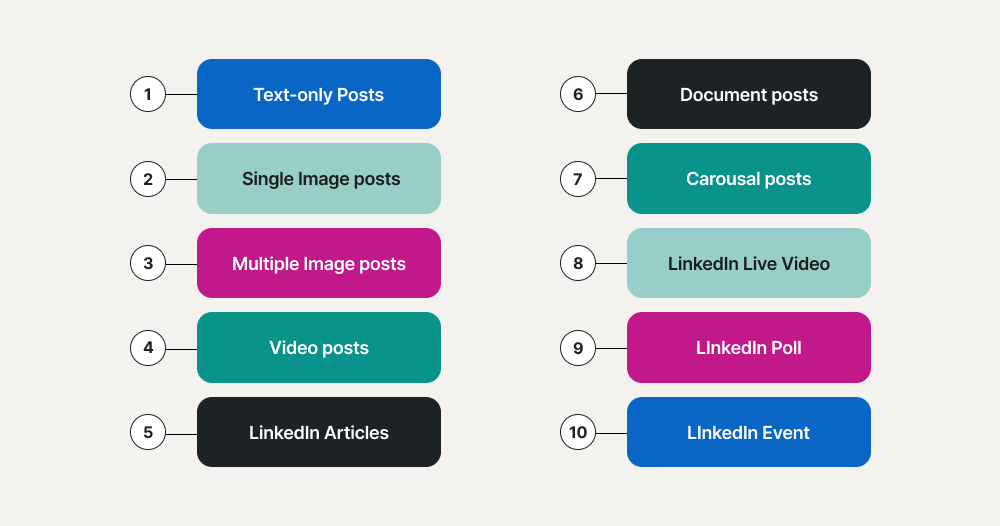
LinkedIn is no longer just a platform for posting professional resumes or sharing industry articles. In recent years, LinkedIn video has become one of the primary content formats used by individuals and businesses to build brands, share knowledge, and connect with professional communities. From short-form videos and how-to guides to webinars and corporate introductions, LinkedIn supports various content types tailored to diverse communication goals. However, not all video types deliver equal performance. Choosing the right format helps content reach the right audience, increase watch time, and improve engagement. Below are the types of videos you can post on LinkedIn and how to leverage each format effectively in 2026.
Professional knowledge-sharing videos
This is the most popular video type on LinkedIn and the primary format for building personal authority or corporate brand credibility. You can share:
- Work experience.
- Industry tips.
- Sector trends.
- Market analysis.
- Problem-solving guides for specific issues.
Educational videos typically attract viewers within the same field and generate high-level professional discussion in comments.
How-to tutorial videos
How-to videos help viewers learn a skill or workflow in a short time. Suitable topics include:
- Tool tutorials.
- Operational workflows.
- Productivity hacks.
- Professional skills.
- Marketing, sales, or management tactics.
This format works well for both personal brands and B2B enterprises.
Company introduction videos
Businesses can utilize videos to introduce their brand, corporate culture, or services. Content generally covers:
- Company history and story.
- Core values.
- Team members.
- Workspace environments.
- Major achievements.
Videos help businesses make a more professional impression compared to text-and-image posts.
Product or service showcase videos
LinkedIn is also an effective platform to present solutions tailored to enterprise clients. Showcase videos should focus on:
- Customer pain points.
- Solutions provided by the business.
- Practical benefits.
- Usage examples or demonstrated results.
Avoid overly direct sales pitches; instead, emphasize the underlying value delivered by the product.
Customer success story videos (Case Studies)
Case studies are widely leveraged by B2B enterprises on LinkedIn. You can share:
- Client challenges.
- Implemented solutions.
- Results achieved.
- Lessons learned.
This video type enhances credibility and proves the real-world efficacy of products or services.
Expert or leadership interview videos
Interview videos provide authenticity and add professional value to content. You can execute:
- CEO interviews.
- Industry expert Q&As.
- Client perspectives.
- Employee testimonials.
The Q&A format keeps content engaging and fosters extended discussions.
Webinar and online conference videos
LinkedIn is a prime platform for repurposing content from webinars or virtual events. You can post:
- Full webinar recordings.
- Summary recaps.
- Key highlights.
- Featured Q&A clips.
This extends the post-event value of virtual sessions.
Behind-the-scenes videos
Behind-the-scenes content makes brands feel more approachable and authentic. Examples include:
- A day in the life of the team.
- Event preparations.
- Production processes.
- Internal team activities.
- Company culture.
This is an effective strategy for employer branding and community building.
Recruitment and career opportunity videos
As a professional network, LinkedIn offers great reach for recruitment videos aimed at prospective candidates. You can highlight:
- Open job roles.
- Work environment.
- Employee benefits.
- Career progression paths.
Videos bring job postings to life, making them more attractive to applicants.
Industry trend and insight videos
Trend analysis videos frequently spark active discussions among professional networks. You can share insights on:
- AI developments.
- Marketing shifts.
- Digital transformation.
- Emerging technologies.
- Business strategy.
- Corporate governance.
This helps position speakers as thought leaders on LinkedIn.
Short-form videos on LinkedIn
LinkedIn increasingly favors short-form videos that deliver concise, single-focused messages. Short videos are ideal for:
- Quick tips.
- Interesting statistics.
- Webinar soundbites.
- Blog post summaries.
- Trend updates.
This format offers high accessibility for mobile users.
Brand storytelling videos
Storytelling allows brands to create emotional connections rather than merely promoting products. You can share stories about:
- The founding journey.
- Failures and key takeaways.
- Core brand values.
- Customer stories.
- Team journeys.
Narrative videos often generate significantly more shares than standard promotional posts.
Video infographics and data visualizations
If your company produces extensive data or research, video infographics make complex information digestible. You can combine:
- Charts.
- Motion graphics.
- Statistical metrics.
- Visual illustrations.
- Concise text overlays.
This format is tailored for research reports, industry whitepapers, or B2B data presentations.
Can I post a video on LinkedIn? The answer is absolutely yes. LinkedIn currently supports video posting on both personal profiles and Company Pages while prioritizing video distribution in feed algorithms. By optimizing titles, descriptions, captions, video length, and tailoring content to LinkedIn’s professional environment, you can increase view counts, establish authority, and expand networking opportunities with clients, partners, or recruiters on the platform.
Contact Info
Are you in need of Facebook advertising or need to rent a quality Facebook advertising account? Don’t worry! Adsupport is a unit specializing in providing reputable Facebook accounts, as well as direct advertising support. Provides all types of advertising accounts such as rent facebook ads account to help you reach and create fast conversions.
Frequently Asked Questions (FAQ)
Yes. You can post videos directly on your personal LinkedIn profile or a LinkedIn Page (Company Page). Both support feed video shares, though their objectives differ: personal profiles suit personal branding, while LinkedIn Pages suit business and product promotion.
It depends on your content goals. Short videos suit quick tips, trend updates, or capturing immediate attention. Long videos fit webinars, in-depth tutorials, case studies, or educational content. Regardless of length, videos should deliver strong value, feature engaging titles, and include subtitles to improve viewer experience.


